Beginner to intermediate
NumPy for Data Science
Build practical NumPy skills for data science: arrays, shapes, selection, vectorized calculations, statistics, files, and introductory linear algebra.
For Python learners preparing to explore, transform, and analyze numerical data
What you will learn
- Create NumPy arrays and inspect their dimensions, shape, size, and data type.
- Reshape arrays and explain how axes correspond to rows, columns, and reductions.
- Select data using indices, slices, and Boolean masks while understanding views and copies.
- Use vectorized operations, universal functions, and broadcasting instead of element-by-element Python loops.
- Calculate summary statistics, handle numeric missing values, and standardize features.
- Reshape, sort, combine, and edit arrays while choosing operations that fit the data.
- Load and save numeric data, make random examples reproducible, and time notebook experiments.
- Distinguish element-wise multiplication from matrix multiplication and solve a small linear system.
Where to use NumPy
- Represent numerical observations as one- and multi-dimensional arrays.
- Select, transform, summarize, and normalize numerical data.
- Prepare array data for visualization, scientific computing, and machine-learning libraries.
What this course does not cover
- NumPy arrays are not a replacement for labeled, mixed-type tables; use a table library when labels and heterogeneous columns are central.
- This course introduces array-based linear algebra, but does not teach the underlying mathematics or a complete machine-learning workflow.
How to use this course
This course is a NumPy module in a data-science learning roadmap. It assumes you can read basic Python, including lists, functions, and for loops. Install NumPy in your Python environment with python -m pip install numpy, then run each example in a script, REPL, or notebook.
The chapters use the conventional import numpy as np. Work through them in order: data science workflows depend on understanding an array's shape, selecting the intended observations, and checking calculations before moving on to higher-level libraries. Examples use APIs documented in the current NumPy stable documentation; consult that documentation for details that may vary by version.
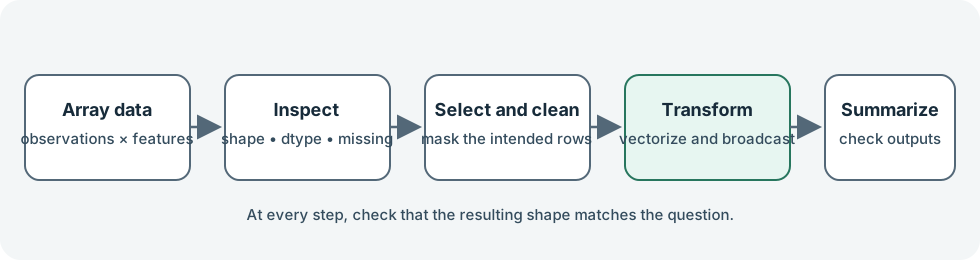
The workflow image summarizes the chapter progression; the official NumPy quickstart covers array structure, shape, and operations.
Course chapters
- 01Arrays, shapes, and data typesCreate NumPy arrays and inspect their dimensions, shape, size, and dtype.
- 02Reshape arrays and reason about axesReshape compatible data and use axes to describe rows, columns, and reductions.
- 03Select data with indices and masksChoose array elements using indices, slices, and Boolean conditions, while avoiding accidental shared-data edits.
- 04Vectorized operations and broadcastingApply element-wise calculations to whole arrays and use compatible shapes without writing Python loops.
- 05Summaries, statistics, and missing valuesSummarize arrays along the intended axis and handle NaN values explicitly.
- 06Load, save, and generate dataRead simple numerical text files, save arrays efficiently, and generate reproducible samples.
- 07Linear algebra essentialsDistinguish element-wise operations from matrix products and solve a small linear system.
- 08Mini-project: prepare a numerical datasetCombine array inspection, missing-value filtering, masks, reductions, and broadcasting in a compact data-preparation workflow.
- 09NumPy function indexSearch common NumPy functions, attributes, and methods by name or task.
Official documentation and further reading
- NumPy — Official project overview, interactive examples, and links into the documentation.
- NumPy: The absolute basics for beginners — Arrays, attributes, indexing, and core beginner concepts.
- NumPy quickstart — Array creation, shape, operations, and axis-oriented examples.
- Array creation — Create arrays from Python sequences and with NumPy routines.
- Array manipulation routines — Reshape, transpose, join, split, and otherwise manipulate arrays.
- Data types — NumPy dtypes, conversions, and numeric representation.
- Indexing on ndarrays — Basic and advanced indexing, slicing, and assignment.
- Copies and views — When array operations share data and when they copy it.
- Broadcasting — Shape compatibility rules for array calculations.
- Universal functions — Element-wise operations, type casting, and reductions.
- Mathematical functions — Element-wise arithmetic, trigonometric functions, and cumulative operations.
- Sorting, searching, and counting — Sort values and find positions or matching elements.
- Statistics — Means, medians, standard deviations, histograms, and related routines.
- Reading and writing files — Read text and CSV data and save NumPy arrays.
- Random sampling — Modern random number generation with Generator and default_rng.
- Linear algebra — Matrix and vector products and NumPy linear algebra routines.
- numpy.linalg.solve — Solve a full-rank square linear system.