Reshape arrays and reason about axes
Reshape compatible data and use axes to describe rows, columns, and reductions.
Reshape without changing the data count
reshape changes how values are arranged into dimensions. The new shape must contain the same total number of elements:
values = np.arange(12)
grid = values.reshape(3, 4)

print(grid)
# [[ 0  1  2  3]
#  [ 4  5  6  7]
#  [ 8  9 10 11]]
print(grid.shape)  # (3, 4)
You can use -1 for one dimension that NumPy can infer from the other dimensions:
rows = np.arange(12).reshape(4, -1)
print(rows.shape)  # (4, 3)
Use T to swap axes of a two-dimensional array:
print(grid.T.shape)  # (4, 3)
print(grid.T)
Array manipulation quick reference:
arr.reshape(shape): change dimensions without changing the element count.arr.T/np.transpose(arr): transpose axes.np.ravel(arr): flatten, returning a view when possible and a copy otherwise.arr.flatten(): flatten and always return a copy.np.concatenate((a, b), axis=0): join along an existing axis.np.vstack((a, b))/np.hstack((a, b)): stack rows / join columns.np.stack((a, b), axis=0): join along a new axis.
For concatenation and stacking, dimensions that are not being joined must match.
Array edits such as np.append, np.insert, and np.delete return new arrays; repeated edits can be inefficient because they allocate and copy data. For numeric arrays, np.resize(arr, shape) repeats values if the requested shape is larger, so it is not the same as reshape and should not be used to add data records.
Axes describe how data is organized
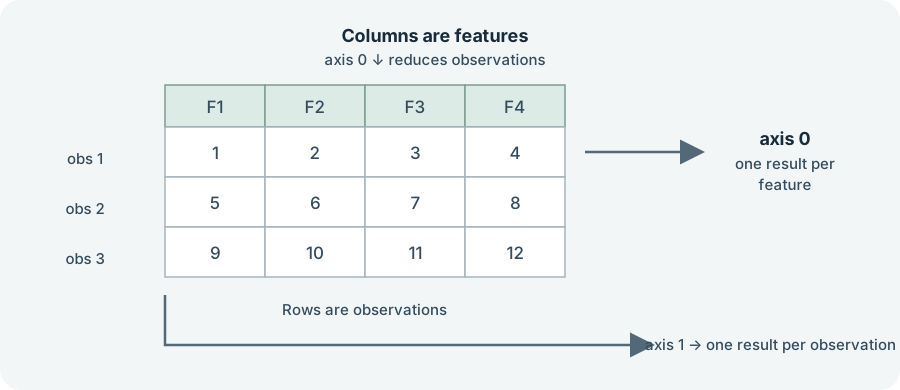
For a table with rows as observations and columns as features, axis 0 runs down the rows; reducing it combines observations and leaves one result per column. Axis 1 runs across columns; reducing it leaves one result per row:
scores = np.array([[80, 90, 70], [100, 85, 95]])

print(scores.mean(axis=0))  # average score in each test
print(scores.mean(axis=1))  # average score for each learner
print(scores.sum())         # all values reduced to one number
Before calling a reduction, say what one output should represent. If the result should be one value per feature, inspect shape and choose the axis that reduces the observations.
For a 2D array, axis 0 is the row direction (down the columns) and axis 1 is the column direction (across each row). A reduction over axis 0 leaves one result per column; a reduction over axis 1 leaves one result per row. The axis names describe the dimension being reduced, not simply a column or row label.
reshape may return a view when the data layout allows it or a copy otherwise. Do not rely on it always copying or always sharing storage; use .copy() when independent data is required.
Exercise: Make an array of 24 values shaped (4, 6). Calculate the sum for each row and each column, and explain the shape of both results.
Sources: NumPy quickstart, Array manipulation routines, Copies and views