Beginner to intermediate
Practical AI Skills for the Workplace
Learn to delegate work to AI assistants, provide useful context, connect tools, create reusable workflows, and automate carefully with human oversight.
For People who want to use AI assistants at work, from individual contributors to technical team leads
What you will learn
- Write a task brief with the goal, context, inputs, output, constraints, and review points.
- Organize durable context so an assistant can find relevant, current information without unnecessary access.
- Choose an appropriate integration approach and recognize its security and maintenance trade-offs.
- Specify outputs with examples, templates, and acceptance criteria.
- Build, test, and maintain reusable skills and team-level extensions.
- Use coding agents and automation platforms with version control, validation, and human approval.
Where these skills help
- Recurring knowledge work with clear inputs, outputs, and review criteria.
- Teams that want to share reliable AI procedures rather than repeat setup in separate chats.
- Processes where integrations or automation can reduce routine work while keeping people accountable.
When to keep the work human-led
- High-impact decisions that require qualified human judgment or legal accountability.
- Tasks involving sensitive data when the AI service, connected tools, or storage are not approved.
- Unreviewed actions that send messages, change records, spend money, or publish externally.
This course turns a supplied video transcript's eight workplace AI skills into a practical learning path. It supplements that source with current official documentation where implementation details are vendor-specific. The transcript also makes predictions about 2026 and 2027; treat those as the speaker's perspective, not guarantees about the future or a description of every product.
You do not need to be a software developer to begin. Start with a repeatable task you understand well. Later chapters introduce Git, integrations, and automation concepts; you can learn those with an engineer when a workflow needs production access or code.
The central habit throughout is to delegate bounded work, give the assistant only appropriate context and permissions, and review consequential results before they are used. Product names and capabilities change quickly, so check the current documentation for the specific tools your organization permits.
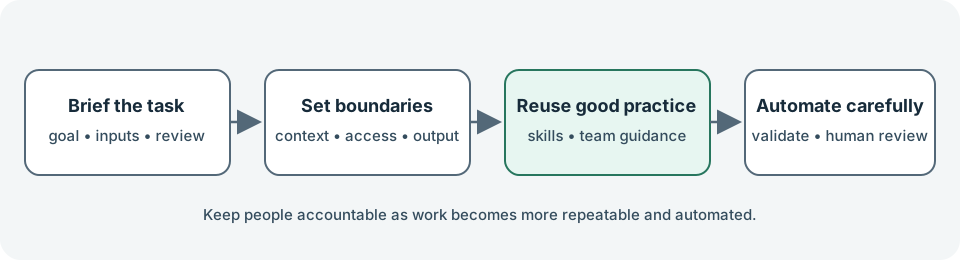
This visual summarizes the course progression; the supplied video transcript motivates its skill sequence.
Eight practical AI skills
- 01Briefing and delegationTurn a vague request into a bounded assignment an AI assistant can complete and you can review.
- 02Context engineeringMake the right background information easy to find, keep it current, and scope it appropriately.
- 03Integrations and accessConnect an assistant to approved tools while minimizing access and checking what actions it can take.
- 04Output and template engineeringSpecify a finished artifact so an assistant creates usable work, not just an unstructured answer.
- 05Reusable agent skillsTurn a reviewed, repeatable process into reusable instructions and supporting resources.
- 06Agentic coding and technical collaborationUse coding agents to explore or build systems while retaining review, version history, and accountable ownership.
- 07Team plugins and governancePackage team capabilities while recognizing that plugins are vendor-specific, not a universal format.
- 08Workflow automation with human oversightAutomate a bounded process with explicit triggers, validation, failure handling, and approval.
References and further reading
- Supplied YouTube video transcript — Source for the eight-skill progression. Its future-facing statements are treated as predictions, not verified facts.
- Agent Skills overview — Anthropic documentation for reusable, modular agent instructions and supporting resources.
- Skills — OpenAI documentation for skills as reusable agent instructions and supporting files.
- What is the Model Context Protocol (MCP)? — Overview of the open protocol for connecting AI applications to external tools and data.
- Connect Claude Code to tools via MCP — Vendor-specific MCP setup and security considerations.
- Plugins overview — Claude Code-specific plugin packaging and component distinctions.
- Security — Claude Code-specific permission controls, prompt-injection risks, and review responsibilities.
- About Git — Git history and collaboration concepts relevant to reviewing agent-authored code.
- Understand workflows — n8n workflow concepts, triggers, execution, publishing, and management.
- Create and run workflows — n8n workflow creation, manual testing, and publishing trigger-based workflows.
- ChatGPT Projects: add context to guide responses — A product-specific example of organizing project context and instructions.