Workflow automation with human oversight
Automate a bounded process with explicit triggers, validation, failure handling, and approval.
From delegated task to running process
A delegated task begins when a person asks an assistant to do work. An automated workflow starts when an event or schedule occurs and moves data through defined steps. For example, a new sales lead might trigger a research draft for a salesperson. The person can then check the research and decide what to do; the automation should not quietly send messages or make commitments unless that action is explicitly approved and controlled.
Most workflow platforms model processes as triggers and connected steps. n8n describes workflows as nodes connected together; workflows can be run manually while building and published to run automatically when trigger conditions are met. Other platforms use different terms, but the need to test and control the process is the same.
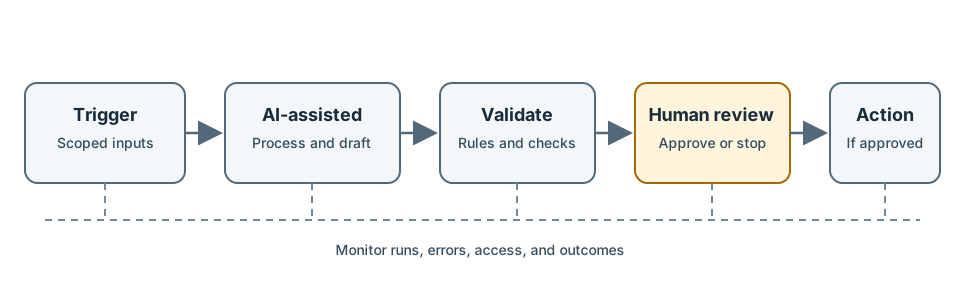
Design for failure
Before enabling a workflow, define:
- Trigger and scope: What event starts it, and which records are eligible?
- Data access: What is the minimum information and permission required?
- Validation: Which outputs can be checked automatically, and which need a person?
- Actions: What is draft-only, and what can change or leave a system?
- Failures: How are timeouts, duplicate events, bad data, and partial runs reported?
- Operations: Who owns monitoring, access reviews, updates, and shutdown?
Test with sample data, then a limited pilot. Add logs and a way to stop or roll back the process. Keep human approval for consequential or uncertain outcomes. Automation can amplify mistakes as easily as it can reduce repetitive work.
Exercise: Sketch a workflow for a repetitive task. Mark its trigger, inputs, validation steps, human approval gate, final action, and failure notification.
Sources: Supplied video transcript; n8n workflow concepts; Create and run workflows; MCP security considerations
Finished the course? Visit the references and further reading.