Beginner to intermediate
Pandas for Data Analysis
Learn to load, inspect, select, clean, transform, summarize, and combine real-world tabular data with pandas.
For Python learners who want to work with labeled, tabular data
What you will learn
- Explain the roles of Series, DataFrame, and index labels.
- Read and write common tabular files and inspect data shape, values, and types.
- Select rows and columns with labels, positions, and Boolean conditions.
- Handle missing data, duplicates, and column types deliberately.
- Create derived columns and aggregate data with groupby.
- Combine tables using concatenation and key-based merges.
- Complete a small analysis from raw records to a checked summary.
Where to use pandas
- Explore and prepare spreadsheet-like or database-style data in Python.
- Clean missing, duplicated, and incorrectly typed tabular values.
- Summarize records by category and combine related datasets.
What this course does not cover
- Pandas is not designed to replace a relational database for storing and querying datasets too large for memory.
- This course focuses on tabular analysis, not a complete statistics, visualization, or machine-learning curriculum.
How to use this course
This course assumes basic Python knowledge, including lists, dictionaries, functions, and importing packages. Install pandas with python -m pip install pandas, then run examples in a Python script, REPL, or notebook. The examples use the conventional import pandas as pd.
Work through the chapters in order. Pandas keeps row and column labels alongside values, so understanding indexes and alignment helps prevent subtle selection and arithmetic errors. Examples focus on small in-memory datasets; for very large datasets, choose storage and processing tools appropriate to their size.
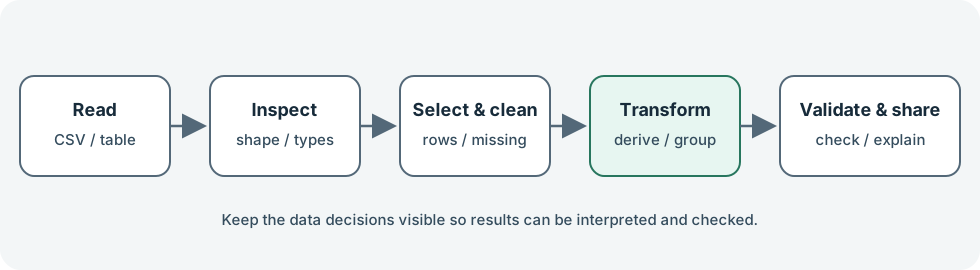
This visual roadmap reflects the operations described in the official pandas user guide.
Course chapters
- 01Series, DataFrames, and labelsMeet pandas’ core data structures and learn why labels and indexes matter.
- 02Load, inspect, and save dataRead tabular data and perform initial checks before analyzing it.
- 03Select, filter, and sortSelect columns and rows using labels, positions, and Boolean conditions.
- 04Clean missing values and typesDetect missing observations, handle duplicates, and choose a suitable column type.
- 05Transform and align dataCreate derived columns and understand how pandas aligns labels during calculations.
- 06Group and aggregateUse groupby to summarize records by one or more categories.
- 07Combine and reshape tablesConcatenate tables, merge related records by key, and reshape summarized data.
- 08Mini-project: analyze a small sales datasetPut file loading, data checks, filtering, grouping, and interpretation together in a compact analysis.
- 09pandas function indexSearch common pandas constructors, methods, and operations by name or task.
Documentation and further reading
- pandas — Official project overview, installation, tutorials, user guide, and API reference.
- pandas API reference — Public pandas objects, functions, and methods.
- 10 minutes to pandas — Official quick introduction to pandas data structures and common operations.
- Intro to data structures — Series, DataFrame, indexes, and labeled data.
- Indexing and selecting data — Select and set data with labels, positions, and conditions.
- Reading and writing files — Read and write CSV, spreadsheet, SQL, and other data formats.
- Working with missing data — Detect, represent, and handle missing values.
- Group by: split-apply-combine — Aggregate, transform, or filter data by groups.
- Merge, join, concatenate and compare — Combine Series and DataFrames along axes or by matching keys.
- Reshaping and pivot tables — Reshape long and wide data and produce pivot tables.
- GeeksforGeeks: Pandas Introduction — An introductory overview of pandas structures, common cleaning tasks, and grouped analysis.
- NVIDIA: What Is pandas? — An overview of tabular data structures, pandas operations, and its role in the Python data ecosystem.